
In the group settings, the user can create, edit, and delete groups. The Paikannin.com allows for the creation of device, beacon, location, and identifier groups
Devices (i.e., vehicles) can be added to device groups. In certain cases, device groups can simplify device management within the Paikannin.com (e.g., regarding access rights). Device group details can be edited via the "Actions" section once the desired device group has been selected.
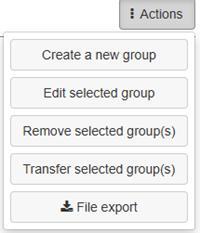
The following information can be provided for device groups:
- Group name
- Contact name
- Contact email
- Contact GSM
If you want specific alarms to be sent to the contact person for a device group, their contact details must be entered on this page. The devices belonging to the group are displayed on the Devices tab. Specific usage times can also be defined for a device group, like device-specific settings. By setting usage times for the group, you can—if desired—overwrite the usage times for all devices within that group simultaneously.
Please note that when new devices are added to the group, their usage times will not automatically update to match the group's settings without a manual update.
IoT beacons can be grouped into beacon groups.
Named locations can be organized into location groups. Grouping named locations allows you to define, for instance, which device groups appear by default in the map view for a specific user based on their settings.
User identifiers can be organized into identifier groups. This feature simplifies identifier management in certain situations.