
The Paikannin.com also allows drivers to log in as a driver via mobile. This feature must be enabled for the account for the menu to be available. Driver credentials are created, and the specific vehicles the driver is authorized to log into are assigned. The driver then selects the correct vehicle from the menu and taps "Login to device."”. Drivers can also be identified automatically using Bluetooth identification tags instead of logging in manually.
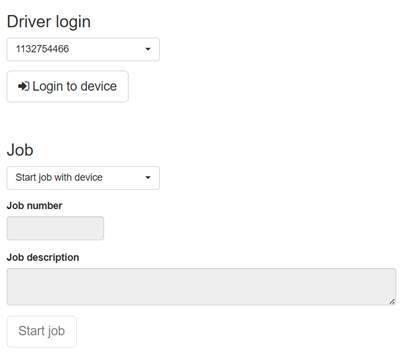
When the driving session is to be ended, click "Log out of device" from the same location.
When logging in, drivers also have the option to register as an on-call driver. The driver must first log in to the device and then select "Start on-call." This allows, for example, a dispatcher to see the nearest vehicles currently on standby directly on the map view.
Drivers can also start and end work tasks from the login page. Job numbers and a description of the work performed can be recorded for the tasks. A task is started by pressing the "Start job" button and ended from the same location by pressing "End job".