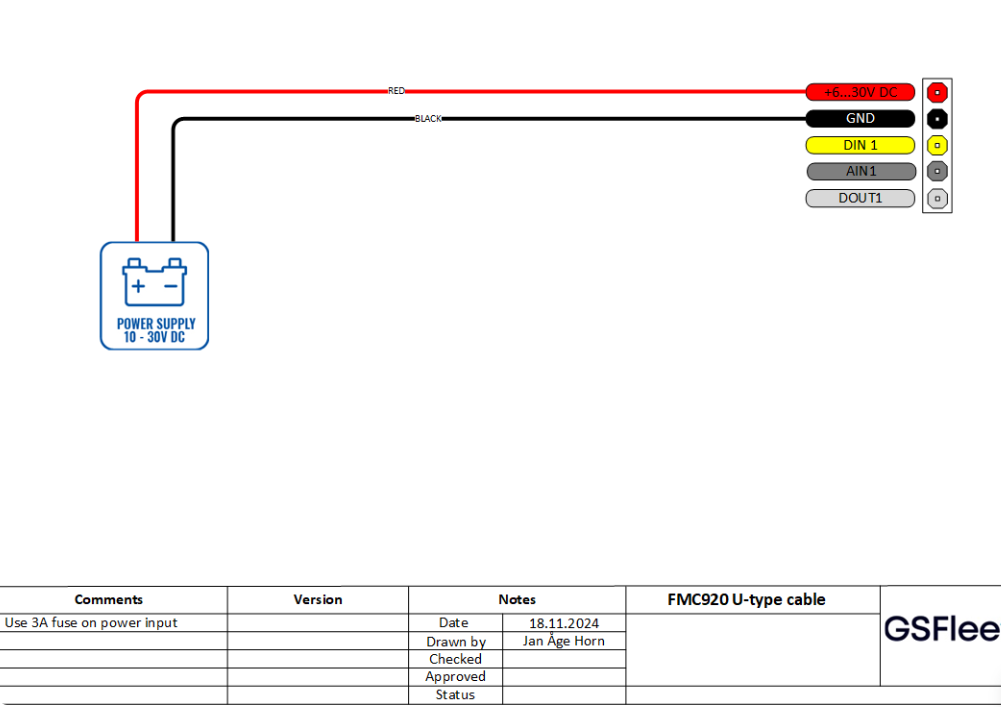
Connections:
Standard cable
RED: Main power +12V (10 - 30V)
BLACK: Main ground
YELLOW: Ignition signal +12V (10-30V)
U-type cable
RED: Main power +12V (10 - 30V)
BLACK: Main ground
The GPRS / GPS unit are tested, and a SIM card is inserted prior to shipping.
Location – Installation
The GNSS /GSM unit must be well attached by using double-sided tape, cable tie or other kind of fastening methods.
The GNSS/ GSM unit must be placed so it has a free view to the sky and can only be put under one layer of plastic/wood/fiberglass.
The GPRS/ GPS unit should not be placed close to other electronic devices, since the unit can cause GSM interference when placed close to radios etc. To achieve the best possible signals, the unit should be placed as high as possible in the object.
Navigation LED:
· Permanently on: GNSS signal not received.
· Blinking every second: Normal Mode, GNSS is working.
· Off: GNSS is turned off.
· Blinking fast: Device firmware is being flashed.
Status LED:
· Blinking every second: Normal mode.
· Blinking every two seconds: Sleep mode.
· Blinking fast for a short time: Modem activity.
· Off: Device not working.
Standard cable: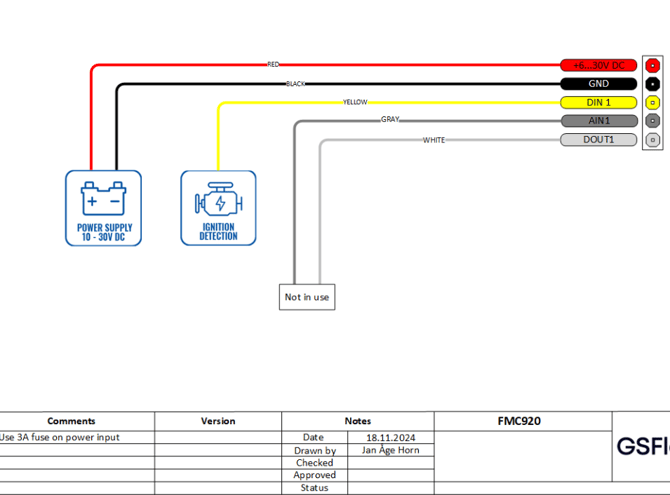
U-type cable: