
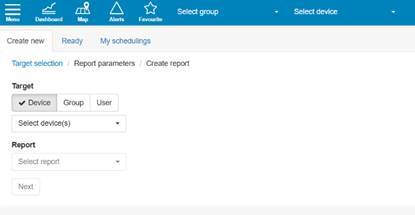
Generating reports is one of the Paikannin.com key features. Reports can be generated for individual devices, device groups, or users. A variety of reports are available for devices and device groups, and you can easily generate an privilege rights report for users.
The following reports, among others, are available for devices and device groups:
- Driving diary
- Contains all the information required by the tax authorities
- Driving diary and Channel Events
- Includes a driving diary and information on where and when each possible channel was used (e.g. plowing or sanding)
- Driving Habit
- Displays records of bad driving behavior for selected vehicles, such as speeding
- CO2 -emissions
- Displays the vehicle's calculated CO2 emissions. This information is also available in the trip log. Note that this requires the vehicle's emission value and emission calculation method to be entered into the Paikannin.com
- Property Maintenance Report
- Property maintenance report (e.g. plowing and sanding) inside property areas
- Arrive / Leave
- A report that allows you to check whether a specific vehicle has visited a named location or any address at a specific time
Once the device or device group for the report has been selected, choose the specific report you wish to run. After making this selection, click "Next." The Paikannin.com then proceeds to the report-specific parameters. Generally, the default parameters are sufficient to run the report and extract the required data. This manual does not cover the specific parameters for the various reports.
Finally, when generating the report, you select the destination and file format. The Paikannin.com allows you to send the report to a specific email address, display it directly in the user interface, or set up scheduled reports.
For each report, you must select a start and end date. Please note that reports can be generated for periods of up to three months. Reporting supports the following file formats:
- CSV
- Raw CSV
- Plain text
- HTML
- XLS
If you wish to run the report directly within the user interface, HTML is the recommended format, as it allows the report to be read directly from the Paikannin.com without needing to download it to your computer or other device.