
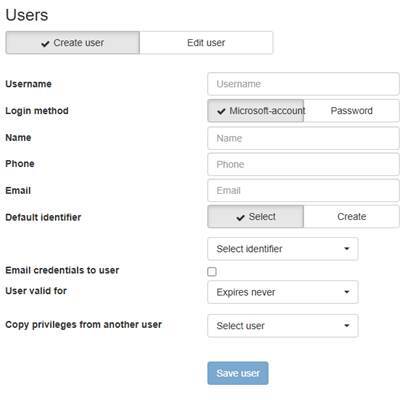
In the Users section, you can create new users, delete users, and edit the details of existing users. The following information can be provided for a user:
- Username (mandatory, if Password login method is used)
- Password (mandatory, if Password login method is used)
- Retype password (mandatory, if Password login method is used)
- Name (mandatory, if Password login method is used)
- User’s first and last name
- Phone
- Email (mandatory)
- Default identifier
- Mandatory, if driver login is used)
- Email credentials to user
- Select this if you want to send login details to the user
- User valid for
- For how long user is activated
- Expires never
- 24 hours
- 48 hours
- One week
- One month
- One year
- For how long user is activated
- Copy privileges from another user
- Access rights can be copied directly from a previously created user
The "Edit user" section allows you to modify the previously mentioned details for existing users. You can also reset a user's password here by entering a new one and sending it to the user.